
Is it time to change your laptop battery? Do you need to check your laptop battery health?
This article will demonstrate to you how to examine the overall health of your laptop battery pack and support you in the decision if today is the day to purchase a replacement unit.
Laptop batteries can keep going a season to more than a few years established on use, and if you’re often on the net, you could be in a position to inform if you’re not really having the lifecycle you first experienced.
>>> Related Post: Tips TO Help You Revitalise Your Old Computer <<<
You can acquire your notebook battery pack overall health by working a command word at the command word prompt.
Laptop batteries can keep going for more than a few years, and if you’re often on the net or doing some heavy gaming, you could be in need of a new laptop battery sooner.
You can figure this out yourself simply by checking your overall battery health by using a command in the command prompt for Windows.
How To Examine Laptop Battery Health In Windows 10.
You can examine the overall health of your battery pack in Windows 10 by using a simple command explained below:
Go to the Start button and type cmd into the dialogue container and strike enter. This will take you to the command page. Next, type in “ powercfg /batteryreport “ and strike enter.
This record will end up being produced and outputted on your laptop to your C:\>Users>Your Username folder as an HTML record that you can open up in your net browser.
This record will provide you with a great deal of stats, but the one particular you desire is capacity versus the full charge capacity. As shown in the image below:
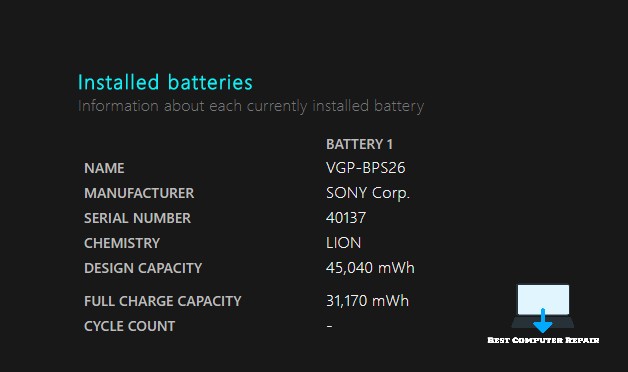
The image above of a Laptop Battery Health report.
The design capacity is the original strength of the battery, and the full charge capacity is the performance you are currently getting. As the full charge capacity number goes straight down.
The less power supply charge length you will acquire. Hence, it is usually a good sign to upgrade your laptop battery.
Guidelines To Extend The Life Of Your Battery
The method you work with your computer system can have a straight-up effect on the lifetime of your laptop’s power supply.
Comply with these guidelines on advancing your power supply lifestyle to acquire more hours out of your laptop battery.
For example, you can turn off your Bluetooth and Wi-Fi when not really in use and tone down your screen’s brightness.
If you discover it’s time to change your laptop’s power supply, search for a replacement unit power supply online using the laptop serial code to make sure you get the correct one.
To locate a replacement unit laptop power supply for your equipment, the best method to perform this can be to take out the power supply and examine the serial number.
>>> Related Post: Tips TO Help You Revitalise Your Old Computer <<<
If you enjoyed reading this post on “How To Check Your Laptop Battery Health“ or if it helped you in any way, please feel free to show your support by giving us a share or a like.
It would mean a lot to us!… Still unsure about something?
Then consider giving us a chance to help you decide the best course of action for your situation, along with what would best meet your requirements.
We are highly flexible with a no fix no fee policy, one of the leading computer repair specialists, plus custom-built PC/server build, cybersecurity experts in Bridgend covering the whole of South Wales, U.K.
Book your FREE no-obligation quote today!
Our normal service area is Bridgend, however, we also cover Swansea, Port Talbot, Bryncethin, Sarn, Ogmore Vale, Maesteg, Llantwit Major, Cowbridge, Barry, Penarth, Dinas Powys, Cardiff, Newport.
Best Computer Repair Bridgend plus South Wales, U.K. also offer worldwide remote support, virus removal, or even custom-built gaming PCs.
We work with competitive rates, contactless payment, free delivery, along with a friendly, professional service that can’t be compared anywhere else in the IT Services industry.
Why not contact us today here or say hello in the live chat at the bottom right of the page.
Thank you for reading, plus have a wonderful week! 🙂
To our continued health plus success
Eric Luis – CEO Best Computer Repair –
Bridgend and South Wales, U.K.


POST REPLY